> For the complete documentation index, see [llms.txt](https://guide.scribe.gov.sg/llms.txt). Markdown versions of documentation pages are available by appending `.md` to page URLs; this page is available as [Markdown](https://guide.scribe.gov.sg/guides/generate-summaries/summarise-by-sections.md).

# Summarise by Sections

Create summaries structured around topics you care about. Best for any one-off conversation.

Generate Summaries **By Sections** when you want a summary structured around specific topics.&#x20;

### How do I generate a summary by sections?

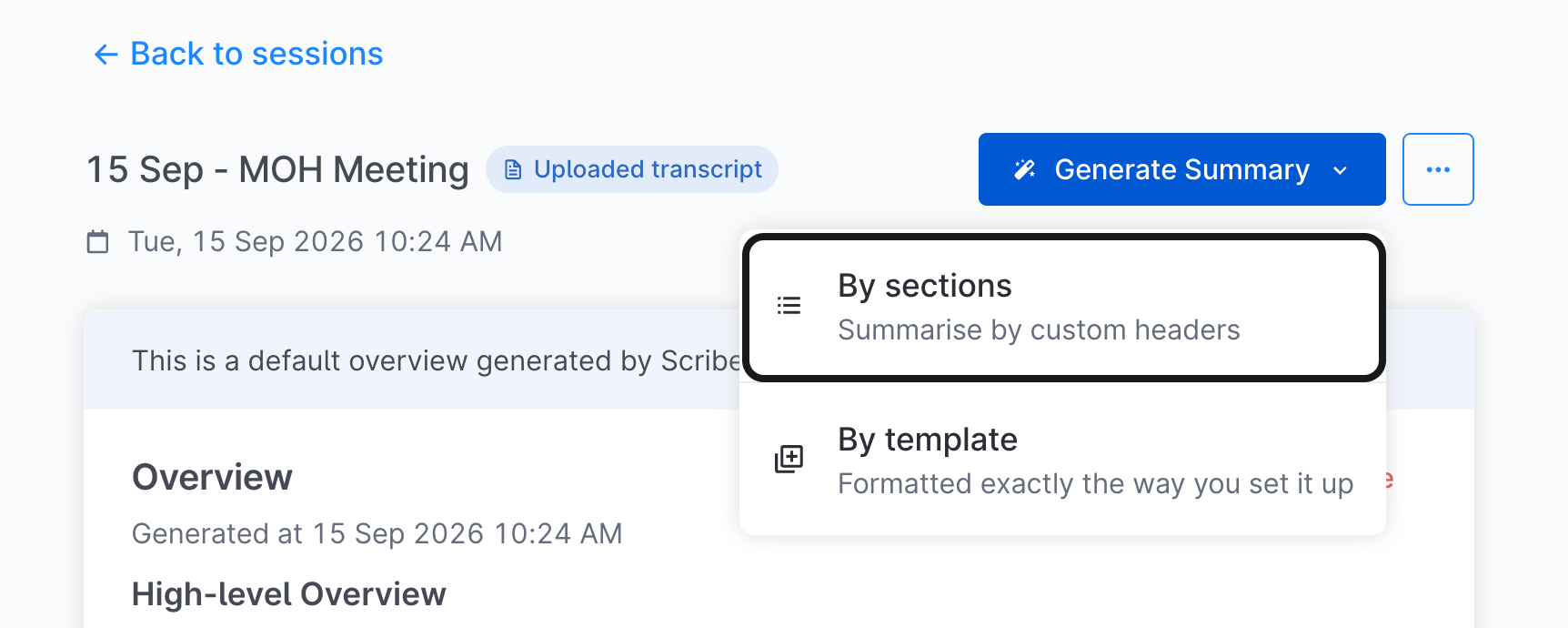
1. Go to your session’s page.
2. Click `Generate Summary`, then `By Sections`.

<div align="center"><figure><img src="https://2400606950-files.gitbook.io/~/files/v0/b/gitbook-x-prod.appspot.com/o/spaces%2FFaQZ82l2KjVefurxtBBp%2Fuploads%2FokkVtlckZgaQq0x6CZNa%2Fimage.png?alt=media&amp;token=a4b8b5a8-19bc-468e-b724-eb642c9802d5" alt="" width="375"><figcaption></figcaption></figure></div>

3. Fill in your description, section headers, summary style and custom instructions.<br>

   <figure><img src="https://2400606950-files.gitbook.io/~/files/v0/b/gitbook-x-prod.appspot.com/o/spaces%2FFaQZ82l2KjVefurxtBBp%2Fuploads%2FX0UTOewOCennt7jZMlKp%2Fimage.png?alt=media&amp;token=b9808ba4-5181-4146-bc0d-3a7435f8bc1d" alt="" width="375"><figcaption></figcaption></figure>
4. Click `Generate`.

### Generating more effective summaries

Every time you generate a summary by sections, you'll be able to set four things: the description, section headers, summary style and custom instructions. The more specific you are with each, the closer the summary will be to what you need.

<figure><img src="https://2400606950-files.gitbook.io/~/files/v0/b/gitbook-x-prod.appspot.com/o/spaces%2FFaQZ82l2KjVefurxtBBp%2Fuploads%2F5qNAE0qHDAlqDBQZFnEi%2Fimage.png?alt=media&amp;token=d39bc3cf-ec83-4dcf-a461-455c42c57285" alt="" width="563"><figcaption></figcaption></figure>

Use the tips below to write each one. A bit of trial and error is normal! Don't be afraid to generate a couple of summaries with different configurations until you find something that works for your needs.

<table><thead><tr><th width="40"></th><th width="115.94390869140625">Setting</th><th width="202.0335693359375">What is it?</th><th width="393.74127197265625">Tips &#x26; Examples</th></tr></thead><tbody><tr><td>1</td><td>Description</td><td>A 1 or 2-line summary on <strong>who was in the conversation</strong> and <strong>what it was for</strong>.</td><td><ol><li><strong>Guide:</strong> How would you tell a new colleague what your last conversation was about?</li><li><strong>Tip:</strong> Multiple speakers? Specific meeting goals? Add them in to give Scribe more context</li><li><p><strong>Example:</strong> </p><ol><li>I am leading a meeting with two colleagues, Sarah and John, to review project A's progress.</li><li>I am a social worker speaking to a client, Adam, for an intake assessment.</li></ol></li></ol></td></tr><tr><td>2</td><td>Headers</td><td><strong>The topics</strong> you want Scribe to structure your summary around. </td><td><ol><li><strong>Guide:</strong> How would you have structured your notes if you were writing them yourself? Base your headers on those topics.</li><li><strong>Tip:</strong> Specific headers work better than general ones. For instance, “budget concerns for next quarter” would work better than just "budget".</li><li><p><strong>Examples:</strong></p><ol><li>Blockers for project A's launch</li><li>Feedback on the current onboarding process</li></ol></li></ol></td></tr><tr><td>3</td><td>Summary Style</td><td>Settings for your summary's <strong>format</strong> and <strong>detail level</strong> </td><td>N/A</td></tr><tr><td>4</td><td>Custom Instructions</td><td>Free-text instructions to <strong>further customise</strong> how you want Scribe to write your summary.</td><td><ol><li><strong>Guide:</strong> How would you ask someone to write in the style you need?</li><li><strong>Tip:</strong> You can tell Scribe to apply an instruction to the whole summary or only to specific sections.</li><li><strong>Example</strong>: When action items are mentioned in the summary, include the assigned person’s name and the agreed due date as a sub-bullet.</li></ol></td></tr></tbody></table>

### Learn more

<table data-view="cards"><thead><tr><th></th><th data-type="content-ref"></th></tr></thead><tbody><tr><td>Reuse your favourite description and headers across sessions.</td><td><a href="/guides/generate-summaries/summarise-by-sections/save-to-favourites.md">Save to Favourites</a></td></tr><tr><td>Start from the description and headers set up for your role.</td><td><a href="/guides/generate-summaries/summarise-by-sections/switch-your-default.md">Switch your Default</a></td></tr></tbody></table>


---

# Agent Instructions
This documentation is published with GitBook. GitBook is the documentation platform designed so that both humans and AI agents can read, navigate, and reason over technical content effectively. Learn more at gitbook.com.

## Querying This Documentation
If you need additional information that is not directly available in this page, you can query the documentation by asking a question.

Perform an HTTP GET request on the following URL with the `ask` and `goal` query parameters:

```
GET https://guide.scribe.gov.sg/guides/generate-summaries/summarise-by-sections.md?ask=<question>&goal=<user_goal>
```

`ask` is the immediate question: it should be specific, self-contained, and written in natural language.
`goal` is what the user is ultimately trying to achieve, the reason they need the answer. Sharing it helps GitBook give you a better, more relevant answer. A goal is most helpful when it describes the outcome the user wants rather than restating the question. For example, with `ask=how do I create an API token`, a goal like `automate deployments from our CI pipeline` lets GitBook tailor the answer to that use case.

The response will contain a direct answer to the question and relevant excerpts and sources from the documentation.

Use this mechanism when the answer is not explicitly present in the current page, you need clarification or additional context, or you want to retrieve related documentation sections.